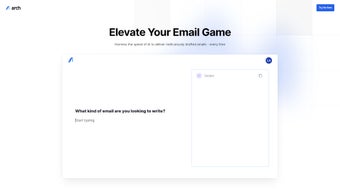

Download Arch AI – AI‑Powered Email Copilot for Faster, Secure Communication
Overview: Transform Your Inbox with Arch AI
In today’s fast‑paced work environment, email remains the central hub of communication, but an overflowing inbox can quickly become a productivity nightmare. Arch AI steps in as a web‑based email copilot designed to cut through the clutter and turn every message into a clear, actionable item. By leveraging cutting‑edge natural language processing, Arch AI delivers instant AI‑generated summaries that distill long threads into bite‑size highlights, allowing you to skim, prioritize, and respond in seconds rather than minutes.
The platform also offers AI‑driven reply suggestions that are not only contextually relevant but also infused with an empathetic tone that mirrors your personal writing style. Whether you need a quick one‑liner or a fully fleshed‑out response, Arch AI adapts its suggestions to match the level of detail you require. Additionally, the tool integrates directly with your calendar, cross‑referencing availability to help you schedule meetings without leaving the email thread.
A built‑in urgency‑detection algorithm flags time‑sensitive messages, ensuring critical communications are never missed. Security is a top priority: all data is encrypted using industry‑standard protocols, and the service complies with GDPR and CCPA regulations. With transparent pricing plans ranging from a free tier for freelancers to enterprise bundles for large teams, Arch AI offers a scalable solution for anyone looking to boost email productivity while maintaining data integrity.
In short, Arch AI reimagines email management as an intelligent, secure, and effortless experience.
Core Features That Elevate Email Management
- Instant AI Summaries: Convert lengthy email chains into concise bullet points, highlighting key decisions, deadlines, and action items.
- Adaptive Reply Generator: Receive context‑aware response drafts that match your tone, from friendly acknowledgments to formal business replies.
- Dynamic Drafting Assistant: Use smart prompts to create quick snippets, full proposals, or nuanced follow‑ups without leaving the inbox.
- Calendar Sync & Smart Scheduling: Seamlessly link with Google Calendar, Outlook, or Apple Calendar to propose meeting times based on mutual availability.
- Urgency Detection Engine: Automated tagging of high‑priority emails, ensuring you address time‑critical messages first.
- Robust Data Encryption: End‑to‑end encryption protects email content, attachments, and metadata, meeting ISO 27001 standards.
- Multi‑Platform Web Access: No installation required; access Arch AI from any browser on Windows, macOS, Linux, Android, or iOS.
- Transparent Pricing Tiers: Free plan for up to 500 emails/month, Pro for power users, and Enterprise with admin controls and SSO integration.
- Continuous Learning Model: The AI refines its suggestions over time, learning from your edits to improve accuracy and relevance.
- Compliance & Audit Logs: Exportable logs for regulatory audits, ensuring every automated action is traceable.
Each feature has been engineered to reduce the mental load associated with daily email handling. For instance, the AI summary tool uses a transformer‑based model that parses thread context, identifies sentiment, and extracts actionable items, all within a fraction of a second. The adaptive reply generator goes beyond simple canned responses; it analyses previous correspondence to capture your unique phrasing, humor, or formality level, producing drafts that require minimal editing. Calendar integration isn’t just a static link—Arch AI reads event titles, locations, and time zones to suggest optimal meeting slots, automatically inserting them into replies. The urgency detection leverages keyword spotting combined with sender reputation scoring, flagging messages that contain phrases like “ASAP,” “deadline,” or “critical.” By bundling these capabilities into a single, secure web app, Arch AI eliminates the need for multiple plugins, extensions, or third‑party services, streamlining the workflow and preserving data privacy across the board.
Installation, Usage Instructions & Compatibility
Getting started with Arch AI is intentionally frictionless. Since it is a cloud‑native solution, there is no traditional “install” process; you simply sign up via the web portal. Follow these steps to activate the copilot:
- Visit archai.com and click “Get Started”.
- Enter your work email address and create a strong password (or use Google/Apple single sign‑on).
- Verify your email through the confirmation link sent to your inbox.
- Connect your email provider (Gmail, Outlook, Yahoo, or custom IMAP/SMTP) by granting OAuth permissions. Arch AI never stores your login credentials; it uses token‑based authentication.
- Optional: Sync your calendar by linking Google Calendar, Microsoft 365, or Apple Calendar.
- Navigate to the “Dashboard” where you’ll see a live preview of AI‑generated summaries for recent threads.
- Click on any email to view suggested replies, urgency tags, and quick‑draft options. Accept, edit, or reject suggestions as needed.
- Adjust preferences under “Settings” – set summary length, tone preference (formal, casual, friendly), and notification frequency.
Operating System Compatibility (itemprop="operatingSystem"): Because Arch AI runs entirely in the browser, it supports any modern OS that can run Chrome, Edge, Firefox, or Safari. This includes Windows 10/11, macOS Ventura and later, Linux distributions with a recent kernel, as well as mobile platforms like Android 9+ and iOS 13+. The responsive design ensures a consistent experience on desktops, tablets, and smartphones.
For power users who prefer a desktop shortcut, you can create a Progressive Web App (PWA) that behaves like a native application, complete with offline caching for reading previously loaded summaries. Arch AI also offers an API for developers who wish to embed its capabilities into internal tools or CRM systems, with comprehensive documentation available in the developer portal. Security best practices such as two‑factor authentication (2FA) and IP‑based access controls are recommended for enterprise deployments, and the platform provides detailed audit logs to satisfy compliance auditors.
Pros, Cons, FAQ & Final Verdict
Pros
- AI summaries dramatically cut reading time, improving focus.
- Reply suggestions preserve personal tone, reducing repetitive typing.
- Seamless calendar integration streamlines meeting coordination.
- Urgency detection ensures critical emails are prioritized.
- End‑to‑end encryption and compliance certifications protect sensitive data.
- Web‑based, no heavy client installation; works on any device.
- Transparent pricing with a functional free tier.
Cons
- Reliant on internet connectivity; offline capabilities are limited to cached data.
- AI suggestions may occasionally misinterpret nuanced context, requiring user correction.
- Full feature set (e.g., API access) is only available on higher‑price plans.
- Initial OAuth setup can be confusing for non‑technical users.
Frequently Asked Questions
-
Is Arch AI compatible with my existing email provider?
Yes. Arch AI supports Gmail, Outlook/Office 365, Yahoo Mail, and any IMAP/SMTP service via OAuth or token‑based authentication.
-
How does Arch AI ensure my data remains private?
All email content is encrypted in transit with TLS 1.3 and at rest using AES‑256. The platform is GDPR and CCPA compliant, and no raw passwords are stored.
-
Can I use Arch AI on mobile devices?
Absolutely. The responsive web app works on Android 9+ and iOS 13+ browsers, and you can install it as a PWA for a native‑like experience.
-
What happens if Arch AI misclassifies an email’s urgency?
The urgency tag is advisory; you can manually adjust priority. The AI learns from your corrections, reducing future errors.
-
Is there a free trial for the premium features?
Yes. Arch AI offers a 14‑day free trial of the Pro plan, giving access to advanced drafting, API calls, and priority support.
Conclusion & Call to Action
Arch AI delivers a compelling blend of AI‑driven efficiency, robust security, and cross‑platform accessibility that can transform how professionals handle email. By turning chaotic inboxes into organized action lists, providing tone‑aware replies, and integrating calendar data, it eliminates many of the repetitive tasks that drain time and mental energy. While it does depend on an internet connection and may need occasional user fine‑tuning, the productivity gains typically outweigh these minor drawbacks.
Whether you’re a freelancer juggling multiple clients, a sales executive managing high‑volume correspondence, or an enterprise seeking to enforce compliance while boosting output, Arch AI offers a scalable solution. Ready to experience a smarter inbox? Download Arch AI now, start with the free tier, and see how much time you can reclaim today.



.png)



